> ## Documentation Index
> Fetch the complete documentation index at: https://docs.calstudio.com/llms.txt
> Use this file to discover all available pages before exploring further.
# API Reference
> How to generate and use your own API key
## API Key
An API Key is a unique identifier used to authenticate requests made from your application to CalStudio APIs.
Think of it as a secure access badge that allows your application to use CalStudio’s services safely.
At CalStudio we allow you to use our APIs using the API keys that we generate for you.
### Creating Your API Keys
You can generate and manage your API keys directly from your CalStudio Dashboard.
Steps to Create an API Key:
1. Log in or Sign up
* Visit calstudio.com and log in with your credentials.
* If you don’t have an account, sign up to access the dashboard.
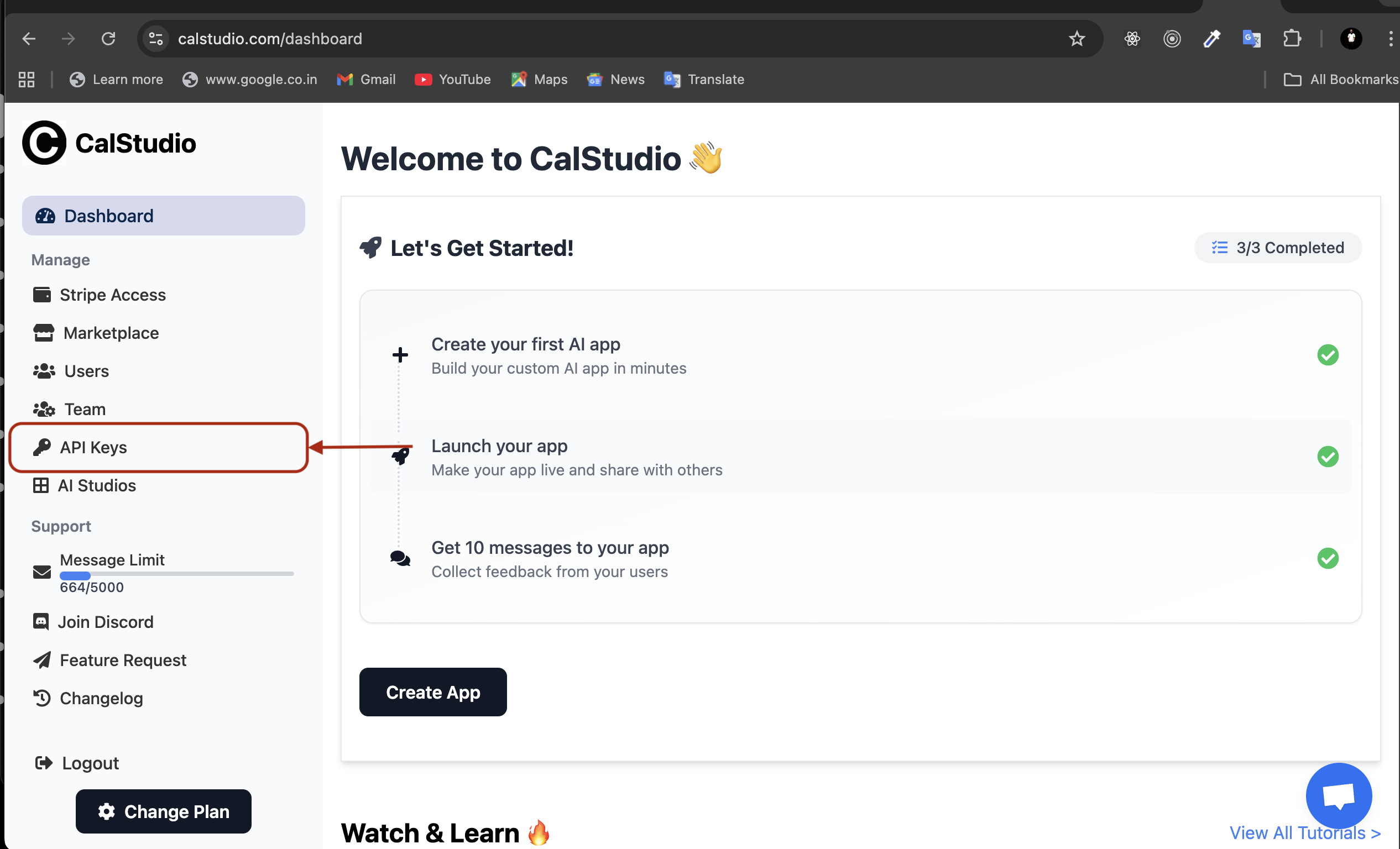
2. Navigate to API Keys Section
* On the left-hand sidebar of the dashboard, locate and click on API Keys.
3. Generate a New Key
* Click the Create API Key button.
* Provide a label or description (optional, but recommended to help you identify usage).
* Your new API key will be generated instantly.
4. Copy and Store Securely
* Copy the key and keep it in a secure location.
### Best Practices for Using API Keys
* Keep it secret → Never share your key publicly (e.g., GitHub, client-side code).
* Restrict usage → Apply restrictions (IP, domain, or service-level) when possible.
* Rotate regularly → Regenerate keys periodically and update your applications.
* Revoke if compromised → Immediately delete and regenerate your key if you suspect unauthorized use.
 ### How to use your API Key
Make POST requests to [https://calstudio.com/getbackResponse](https://calstudio.com/getbackResponse) with the following parameters in the request body:
* prompt: Your input text
* apiKey: Your API key
* appName: Name of your app
* fileUrl (optional): URL to a file (image, PDF, or other document) for the AI to analyze. Only one file per request is supported.
```javascript NodeJS theme={null}
const axios = require("axios");
async function getAppResponse() {
try {
const response = await axios.post("https://calstudio.com/getbackResponse", {
prompt: "Hello, how are you?",
apiKey: "your_api_key_here",
appName: "your_app_name", // replace with your app name
});
console.log(response.data);
// {
// message: "App's response",
// status: 200,
// success: true
// }
} catch (error) {
console.error("Error:", error);
}
}
```
```python Python theme={null}
import requests
def get_app_response():
try:
response = requests.post(
'https://calstudio.com/getbackResponse',
json={
'prompt': 'Hello, how are you?',
'apiKey': 'your_api_key_here',
'appName': 'your_app_name' // replace with your app name
}
)
print(response.json())
except Exception as e:
print('Error:', str(e))
```
```java Java theme={null}
public class AppRequest {
public static void main(String[] args) {
OkHttpClient client = new OkHttpClient();
MediaType mediaType = MediaType.parse("application/json");
String json = "{"
+ "\"prompt\":\"Hello, how are you?\","
+ "\"apiKey\":\"your_api_key_here\","
+ "\"appName\":\"your_app_name\""
+ "}";
RequestBody body = RequestBody.create(json, mediaType);
Request request = new Request.Builder()
.url("https://calstudio.com/getbackResponse")
.post(body)
.addHeader("Content-Type", "application/json")
.build();
try (Response response = client.newCall(request).execute()) {
System.out.println(response.body().string());
} catch (Exception e) {
e.printStackTrace();
}
}
}
```
```ruby Ruby on Rails theme={null}
require 'httparty'
response = HTTParty.post(
'https://calstudio.com/getbackResponse',
headers: { 'Content-Type' => 'application/json' },
body: {
prompt: 'Hello, how are you?',
apiKey: 'your_api_key_here',
appName: 'your_app_name'
}.to_json
)
puts response.body
```
```go Go theme={null}
package main
import (
"bytes"
"fmt"
"io/ioutil"
"net/http"
)
func main() {
url := "https://calstudio.com/getbackResponse"
jsonData := []byte(`{
"prompt": "Hello, how are you?",
"apiKey": "your_api_key_here",
"appName": "your_app_name"
}`)
req, err := http.NewRequest("POST", url, bytes.NewBuffer(jsonData))
if err != nil {
panic(err)
}
req.Header.Set("Content-Type", "application/json")
client := &http.Client{}
resp, err := client.Do(req)
if err != nil {
panic(err)
}
defer resp.Body.Close()
body, _ := ioutil.ReadAll(resp.Body)
fmt.Println(string(body))
}
```
## Working with files
You can provide file URLs in your API requests to have the AI analyze images, PDFs, and other documents. Simply include the fileUrl parameter with a valid, publicly accessible URL to your file. Note: Only one file per request is supported.
```javascript NodeJS theme={null}
const axios = require("axios");
async function getAppResponseWithFile() {
try {
const data = {
prompt: "What does this image show?",
apiKey: "your_api_key_here",
appName: "your_app_name",
fileUrl: "https://example.com/path/to/your/image.jpg",
};
const response = await axios.post(
"https://calstudio.com/getbackResponse",
data
);
console.log(response.data);
// {
// message: "App's response about the image",
// status: 200,
// success: true
// }
} catch (error) {
console.error("Error:", error);
}
}
```
```python Python theme={null}
import requests
def get_app_response_with_file():
try:
# Create request data with file URL
data = {
'prompt': 'What does this image show?',
'apiKey': 'your_api_key_here',
'appName': 'your_app_name',
'fileUrl': 'https://example.com/path/to/your/image.jpg'
}
# Make the request with data including file URL
response = requests.post(
'https://calstudio.com/getbackResponse',
json=data
)
print(response.json())
# {
# "message": "App's response about the image",
# "status": 200,
# "success": true
# }
except Exception as e:
print('Error:', str(e))
```
```ruby Ruby on Rails theme={null}
require 'httparty'
class AppResponsesController < ApplicationController
include HTTParty
base_uri "https://calstudio.com"
def get_app_response_with_file
response = self.class.post(
"/getbackResponse",
body: {
prompt: "What does this image show?",
apiKey: "your_api_key_here",
appName: "your_app_name",
fileUrl: "https://example.com/path/to/your/image.jpg"
}.to_json,
headers: { "Content-Type" => "application/json" }
)
render json: {
status: response.code,
body: response.parsed_response
}
rescue => e
render json: { error: e.message }, status: 500
end
end
```
```go Go theme={null}
package main
import (
"bytes"
"encoding/json"
"fmt"
"io/ioutil"
"net/http"
)
func getAppResponseWithFile() {
// Request payload
data := map[string]string{
"prompt": "What does this image show?",
"apiKey": "your_api_key_here",
"appName": "your_app_name",
"fileUrl": "https://example.com/path/to/your/image.jpg",
}
// Convert map to JSON
jsonData, err := json.Marshal(data)
if err != nil {
fmt.Println("Error encoding JSON:", err)
return
}
// Make POST request
resp, err := http.Post("https://calstudio.com/getbackResponse",
"application/json", bytes.NewBuffer(jsonData))
if err != nil {
fmt.Println("Error making request:", err)
return
}
defer resp.Body.Close()
// Read response
body, err := ioutil.ReadAll(resp.Body)
if err != nil {
fmt.Println("Error reading response:", err)
return
}
fmt.Println("Response:", string(body))
}
func main() {
getAppResponseWithFile()
}
```
### How to use your API Key
Make POST requests to [https://calstudio.com/getbackResponse](https://calstudio.com/getbackResponse) with the following parameters in the request body:
* prompt: Your input text
* apiKey: Your API key
* appName: Name of your app
* fileUrl (optional): URL to a file (image, PDF, or other document) for the AI to analyze. Only one file per request is supported.
```javascript NodeJS theme={null}
const axios = require("axios");
async function getAppResponse() {
try {
const response = await axios.post("https://calstudio.com/getbackResponse", {
prompt: "Hello, how are you?",
apiKey: "your_api_key_here",
appName: "your_app_name", // replace with your app name
});
console.log(response.data);
// {
// message: "App's response",
// status: 200,
// success: true
// }
} catch (error) {
console.error("Error:", error);
}
}
```
```python Python theme={null}
import requests
def get_app_response():
try:
response = requests.post(
'https://calstudio.com/getbackResponse',
json={
'prompt': 'Hello, how are you?',
'apiKey': 'your_api_key_here',
'appName': 'your_app_name' // replace with your app name
}
)
print(response.json())
except Exception as e:
print('Error:', str(e))
```
```java Java theme={null}
public class AppRequest {
public static void main(String[] args) {
OkHttpClient client = new OkHttpClient();
MediaType mediaType = MediaType.parse("application/json");
String json = "{"
+ "\"prompt\":\"Hello, how are you?\","
+ "\"apiKey\":\"your_api_key_here\","
+ "\"appName\":\"your_app_name\""
+ "}";
RequestBody body = RequestBody.create(json, mediaType);
Request request = new Request.Builder()
.url("https://calstudio.com/getbackResponse")
.post(body)
.addHeader("Content-Type", "application/json")
.build();
try (Response response = client.newCall(request).execute()) {
System.out.println(response.body().string());
} catch (Exception e) {
e.printStackTrace();
}
}
}
```
```ruby Ruby on Rails theme={null}
require 'httparty'
response = HTTParty.post(
'https://calstudio.com/getbackResponse',
headers: { 'Content-Type' => 'application/json' },
body: {
prompt: 'Hello, how are you?',
apiKey: 'your_api_key_here',
appName: 'your_app_name'
}.to_json
)
puts response.body
```
```go Go theme={null}
package main
import (
"bytes"
"fmt"
"io/ioutil"
"net/http"
)
func main() {
url := "https://calstudio.com/getbackResponse"
jsonData := []byte(`{
"prompt": "Hello, how are you?",
"apiKey": "your_api_key_here",
"appName": "your_app_name"
}`)
req, err := http.NewRequest("POST", url, bytes.NewBuffer(jsonData))
if err != nil {
panic(err)
}
req.Header.Set("Content-Type", "application/json")
client := &http.Client{}
resp, err := client.Do(req)
if err != nil {
panic(err)
}
defer resp.Body.Close()
body, _ := ioutil.ReadAll(resp.Body)
fmt.Println(string(body))
}
```
## Working with files
You can provide file URLs in your API requests to have the AI analyze images, PDFs, and other documents. Simply include the fileUrl parameter with a valid, publicly accessible URL to your file. Note: Only one file per request is supported.
```javascript NodeJS theme={null}
const axios = require("axios");
async function getAppResponseWithFile() {
try {
const data = {
prompt: "What does this image show?",
apiKey: "your_api_key_here",
appName: "your_app_name",
fileUrl: "https://example.com/path/to/your/image.jpg",
};
const response = await axios.post(
"https://calstudio.com/getbackResponse",
data
);
console.log(response.data);
// {
// message: "App's response about the image",
// status: 200,
// success: true
// }
} catch (error) {
console.error("Error:", error);
}
}
```
```python Python theme={null}
import requests
def get_app_response_with_file():
try:
# Create request data with file URL
data = {
'prompt': 'What does this image show?',
'apiKey': 'your_api_key_here',
'appName': 'your_app_name',
'fileUrl': 'https://example.com/path/to/your/image.jpg'
}
# Make the request with data including file URL
response = requests.post(
'https://calstudio.com/getbackResponse',
json=data
)
print(response.json())
# {
# "message": "App's response about the image",
# "status": 200,
# "success": true
# }
except Exception as e:
print('Error:', str(e))
```
```ruby Ruby on Rails theme={null}
require 'httparty'
class AppResponsesController < ApplicationController
include HTTParty
base_uri "https://calstudio.com"
def get_app_response_with_file
response = self.class.post(
"/getbackResponse",
body: {
prompt: "What does this image show?",
apiKey: "your_api_key_here",
appName: "your_app_name",
fileUrl: "https://example.com/path/to/your/image.jpg"
}.to_json,
headers: { "Content-Type" => "application/json" }
)
render json: {
status: response.code,
body: response.parsed_response
}
rescue => e
render json: { error: e.message }, status: 500
end
end
```
```go Go theme={null}
package main
import (
"bytes"
"encoding/json"
"fmt"
"io/ioutil"
"net/http"
)
func getAppResponseWithFile() {
// Request payload
data := map[string]string{
"prompt": "What does this image show?",
"apiKey": "your_api_key_here",
"appName": "your_app_name",
"fileUrl": "https://example.com/path/to/your/image.jpg",
}
// Convert map to JSON
jsonData, err := json.Marshal(data)
if err != nil {
fmt.Println("Error encoding JSON:", err)
return
}
// Make POST request
resp, err := http.Post("https://calstudio.com/getbackResponse",
"application/json", bytes.NewBuffer(jsonData))
if err != nil {
fmt.Println("Error making request:", err)
return
}
defer resp.Body.Close()
// Read response
body, err := ioutil.ReadAll(resp.Body)
if err != nil {
fmt.Println("Error reading response:", err)
return
}
fmt.Println("Response:", string(body))
}
func main() {
getAppResponseWithFile()
}
```